

New 10 AI Prompts for Stylish Modern Women with Premium Fashion Photography in Art Galleries
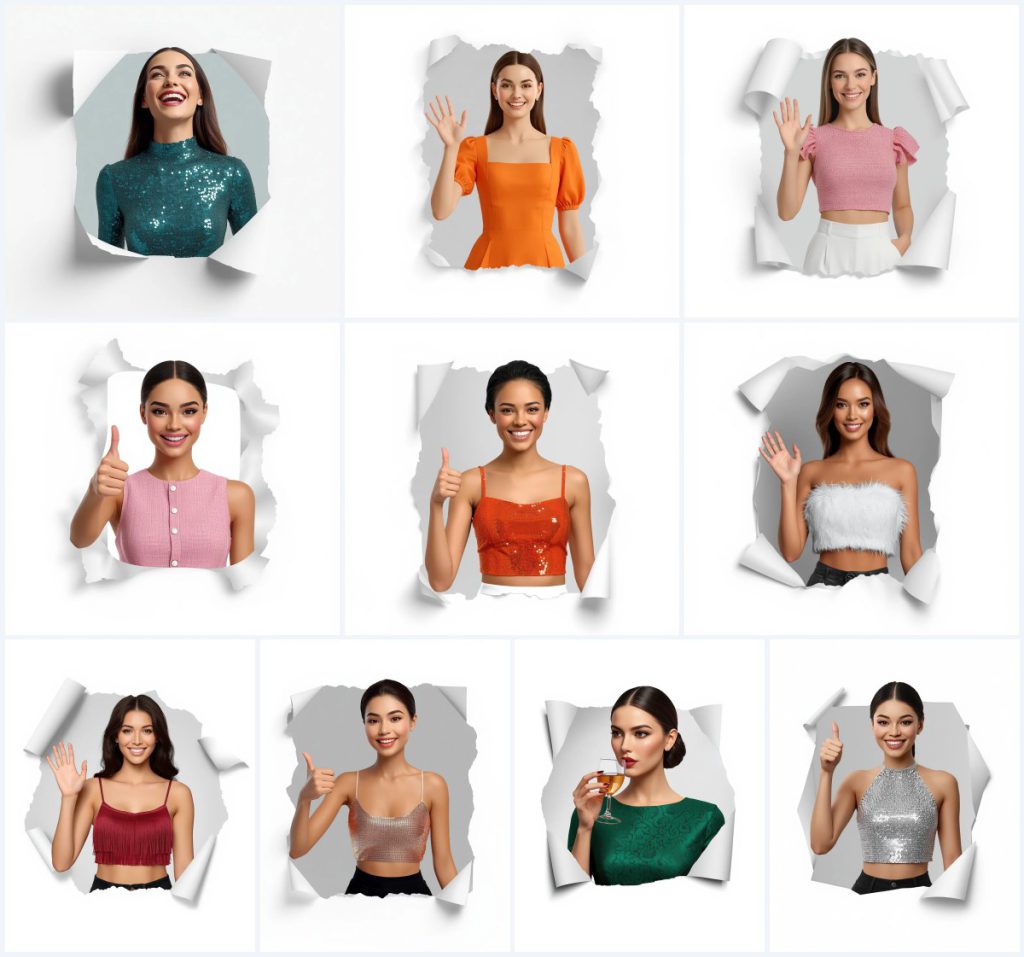
This set gathers ten AI image prompts built around one very specific visual trick: a woman appears to push out of a torn paper hole, chest-up, as if the page itself has been ripped open. Each card changes her outfit, her expression, and her gesture, but the framing, lighting, background, and render style stay locked together. That consistency is the point. You are not collecting ten unrelated portraits; you are collecting ten variations of a single, carefully controlled portrait system.
The titles in the set range from a joyful woman laughing in a glittering teal blue mini dress to a friendly woman waving in a vibrant tangerine orange midi dress, a cheerful woman giving thumbs-up in a playful pink tweed dress, a sophisticated woman sipping a drink in a chic emerald green brocade dress, and a cheerful woman giving thumbs-up in a sparkling silver halter top. Around those sit a pink tweed crop top, an orange sequin top, a white feathered crop top, a cherry red fringe top, and a sparkling rose gold top. Read together, they are a wardrobe study inside one fixed frame.
What this torn-paper portrait set is actually asking for
Every prompt in the set opens with the same technical instruction: an ultra-clean, high-resolution, sharp, polished 3D render of a beautiful woman, with her facial identity and features held identical across all frames. That single clause is what turns ten separate images into a series. The model is being told, before anything about clothing or pose, that the face must not drift. The rest of the prompt then describes the torn paper hole, the soft studio lighting, and the locked pure white background, so the only variables left are the dress, the top, and the gesture.
The recurring physical details are worth listing, because they are what you will actually check in the output:
- A torn paper hole with realistic ripped edges wrapping around her half-body
- A 3D popping-out effect against a subtle light grey gradient inside the paper hole
- Only her chest-up visible, framed in a 4:5 vertical aspect ratio
- Soft studio lighting, even and clean, with no harsh shadows
- A single cool, crisp pure white background, locked without gradient or colour shift
- A polished 3D-render finish that reads as photographic rather than illustrated
The scene inside the paper hole
The setting is deliberately empty. The prompt calls for "a single cool, crisp pure white, locked without gradient or color shift", which means there is no room, no furniture, and no prop clutter competing with the subject. The only architecture in the frame is the paper itself: "realistic, ripped edges wrapping naturally around her half-body", with a "subtle light grey gradient inside the paper hole" giving the tear depth. It is a studio portrait disguised as a paper craft.
The lighting instruction is equally strict. "Soft studio lighting, even and clean, casting no harsh shadows and providing smooth highlights" removes the dramatic side-light that many fashion prompts rely on. What remains is a flat, bright, almost product-photography quality of light. That choice is what allows a glittering teal blue mini dress and a sparkling silver halter top to sit in the same series without one overpowering the other.
Why this format works for fashion portraits
The torn-paper device solves a problem that ordinary portrait prompts keep running into. A plain white background with a chest-up subject can look like a passport photo. Adding a physical tear gives the image a frame within the frame, so the eye has somewhere to land before it finds the face. It also creates an excuse for the crop: she is not cut off at the chest, she is emerging from an opening. That small narrative shift makes a static portrait feel like a moment.
Three reasons this particular set holds up:
- The locked identity clause keeps a ten-image series usable as a set rather than ten strangers
- The fixed white background and soft lighting make outfit colour the only real variable, which is ideal for comparison
- The popping-out effect gives a flat portrait a sense of depth without adding a second subject or a busy set
Three looks living inside this one prompt
You do not need to rewrite the prompt to change its flavour. Three distinct looks are already available inside it, and each one stays within the same torn-paper frame, the same soft studio lighting, and the same pure white background. The paragraph above describes three, not five, because the set itself only offers three genuine stylistic directions once you remove the outfit swaps.
- Polished 3D render: The opening instruction for an ultra-clean, sharp, polished 3D render pushes the image toward a glossy, almost sculpted finish where skin and fabric both look slightly too perfect to be a raw photograph.
- Editorial fashion portrait: The chest-up 4:5 crop, the locked white background, and the even studio lighting together produce the flat, confident framing of a magazine beauty shot rather than a candid photo.
- Paper-craft illusion: The torn paper hole with realistic ripped edges and the subtle light grey gradient inside it turn the image into a physical object, a portrait printed on a page that has been torn open.
How to run this set without losing the face
The set is designed to be run repeatedly, once per outfit, and the whole value of it depends on the face staying the same between runs. That means your workflow matters as much as the prompt text. Work through the same sequence each time, and keep one reference image on hand so you are never relying on memory. If you are generating all ten, treat the first successful result as your anchor and reuse it as the identity reference for the remaining nine.
- Copy the prompt. Paste the full prompt text into your chosen tool exactly as written, including the identity clause and the 4:5 aspect ratio instruction.
- Upload a reference. Attach a clear, evenly lit photo of the face you want to keep, ideally straight-on, with no sunglasses and no heavy shadow across the features.
- Set the frame. Confirm the output is 4:5 vertical before generating, since the prompt specifies chest-up framing inside that ratio.
- Generate the first variation. Run the teal blue mini dress version first and judge it as your anchor image before moving to the other nine outfits.
- Check hands, face, and the main object. Inspect the thumbs-up or waving hand for finger count, verify the face still matches the reference, and confirm the torn paper edges look like paper rather than a soft blur.
- Re-run with small edits. Change only the outfit and gesture lines between runs, leaving the lighting, background, and identity clauses untouched.
Choosing the reference photo
Because the prompt demands that facial identity and features stay identical across all frames, the reference image is doing more work here than in a typical portrait prompt. A weak reference will produce a weak series, no matter how well the rest of the prompt is written. Aim for a photo that shows the face clearly, at a similar angle to the chest-up framing you want, and in lighting that is not wildly different from the soft studio setup described in the prompt.
Three things to keep in mind:
- Use a straight-on or near-straight-on shot so the model has clean information about the face shape
- Avoid harsh directional light in the reference, since the prompt asks for even lighting with no harsh shadows
- Keep the reference free of hats, heavy glasses, and strong filters that would fight the polished 3D render finish
Which tools handle this prompt best
Not every generator treats a locked identity clause the same way. Some will hold the face beautifully across runs and then slip on the torn paper edges; others nail the paper texture but drift on the features. The table below reflects the general strengths you can expect, and the final column notes the specific detail each tool tends to handle well or badly in this particular set.
| Tool | Access | Typical realism | Useful here for |
|---|---|---|---|
| ChatGPT | Free and paid tiers | High for studio-style portraits | Following the long identity and lighting instructions in one pass, though it may soften the ripped paper edges |
| Google Gemini | Free and paid tiers | High, with strong prompt adherence | Keeping the pure white background locked without an unwanted gradient creeping in behind the torn hole |
| Leonardo AI | Free credits, paid plans | Very high for 3D render looks | The polished 3D render finish and the popping-out effect of the paper hole, though faces can drift between runs |
| Midjourney | Paid subscription | Very high, more stylised | Dramatic fabric rendering on the glittering teal blue mini dress and the sparkling silver halter top, but the 4:5 crop needs checking |
Small adjustments that protect the look
Most of the trouble with this set comes from small details rather than the overall concept. The torn paper edge, the fabric texture, and the background lock are the three places where a good result can quietly fall apart. These three tips name the actual materials and objects the prompt describes, so you can check them directly in the output instead of guessing at what went wrong.
- Inspect the ripped paper edges closely, since a soft or blurry tear destroys the paper-craft illusion faster than any other flaw
- Check the fabric on textured pieces such as the pink tweed dress and the white feathered crop top, where the render can smear detail into a flat colour
- Confirm the background is still a single cool, crisp pure white, because an accidental grey wash behind the torn hole makes the whole frame look muddy
Common failures and what to change
These are the failures this specific prompt tends to produce, not generic image problems. Each one has a targeted fix that leaves the rest of the prompt intact, so you are not rebuilding the whole thing to solve a single defect. Change one line at a time and re-run, otherwise you will not know which edit actually helped.
| Issue | What to change |
|---|---|
| The face changes between outfit runs | Strengthen the identity clause and reuse your first good result as the reference image for every later run |
| The torn paper edge looks like a soft blur | Add wording that emphasises crisp, fibrous paper fibres along the rip and reduce any instruction that softens the overall image |
| Hands are malformed on the thumbs-up and waving poses | Describe the hand more plainly, or switch that card to a pose where the hand is partly out of frame |
| The white background picks up a grey cast | Restate that the background is pure white and locked, and remove any wording that mentions shadow or gradient outside the paper hole |
Frequently Asked Questions
Can I run all ten outfits and keep the same face?
Yes, and that is the intended use. The prompt already asks for identical facial identity across all frames, so your job is to keep the reference image and the identity wording unchanged while you swap only the outfit and gesture lines.
Why does the prompt specify a 4:5 vertical ratio?
The chest-up framing and the torn paper hole are composed for a vertical crop. Generating in a square or landscape ratio usually forces the model to widen the tear or pull back from the face, which weakens the popping-out effect.
What should I check first in a finished image?
Start with the torn paper edges, then the hands, then the face. The paper tear carries the whole illusion, the hands fail most often on the thumbs-up and waving poses, and the face is the detail that decides whether the set works as a series.
Conclusion
This collection is less about ten separate pictures and more about one strong idea executed ten times. The torn paper hole, the soft studio lighting, the locked white background, and the identical-face clause form a tight frame, and every card in the set simply changes the dress, the top, and the gesture inside it. Run the teal blue mini dress version first, get the face right, and then treat that result as your anchor for the rest. If you keep the fixed clauses untouched and edit only the outfit and pose, you will end up with a coherent premium fashion series rather than a folder of unrelated portraits.
Edit only photos you own or have permission to use, and keep your reference images to faces you have the right to work with.