

Best 10 Stable Diffusion Prompts for Men’s Diverse Artistic Styles and Realistic Outputs
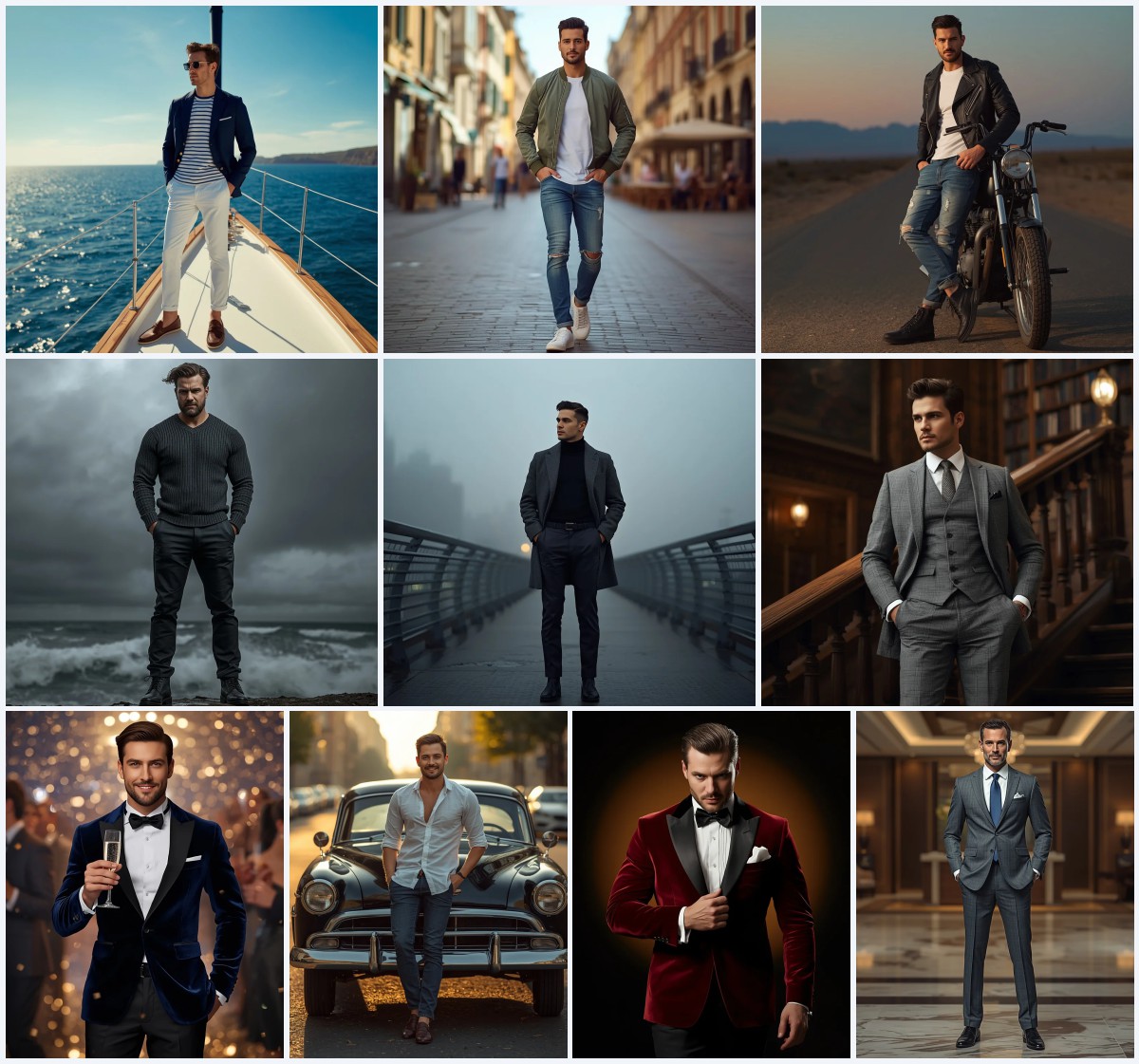
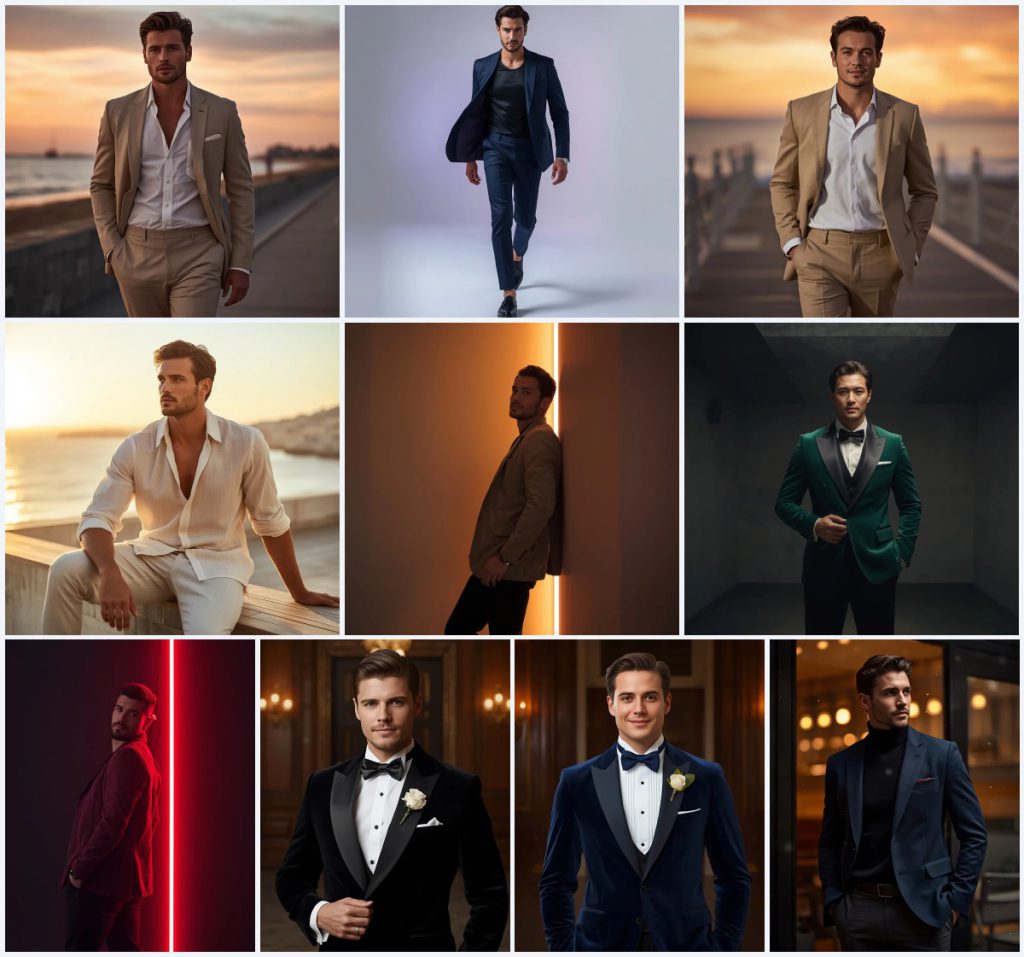
This collection gathers ten Stable Diffusion prompts that explore men's fashion and portrait photography across very different moods. Some prompts place a man in a relaxed beige suit on a beach boardwalk at sunset, while others put him in a midnight blue designer suit inside a clean white studio. The set moves from warm, romantic outdoor light to hard, high-contrast interior lighting without losing a consistent focus on realistic skin and fabric.
Each prompt is built around a full-body or portrait composition with specific wardrobe, pose, and lighting instructions. The shared thread is a calm, confident male subject, an 85mm lens at f1.8, and a demand for ultra-realistic textures. Below is a practical breakdown of what these prompts contain, how to run them, and where they tend to fail.
What this men's prompt collection is asking for
The collection is a set of ten separate prompts that all aim at photorealistic male portraiture with a strong styling direction. Each one specifies a pose, an outfit, a location, and a lighting setup, then adds camera settings such as an 85mm lens and f1.8. The prompts are written for Stable Diffusion but the same text works in other generators with minor tweaks.
- A relaxed-fit beige suit with a white linen shirt on a beach boardwalk at sunset
- A midnight blue designer suit over a black silk tee in a white studio with a grey and lavender gradient
- A cream linen shirt with rolled-up sleeves and light beige trousers on a wooden deck over the ocean
- A tailored beige suede jacket and black trousers beside a vertical warm orange light strip in a modern loft
- An emerald green velvet tuxedo with black silk lapels under a single overhead spotlight in a concrete room
- A black velvet blazer with a silk bowtie and a white rose boutonniere in a dimly lit ballroom lobby
The shared scene across these ten prompts
Every prompt builds a small stage for one man. The beach boardwalk prompt uses "a full-body walking pose" and "the warm orange and pink sunset sky casts a golden glow over his face" to set a calm outdoor mood. The studio prompt instead asks for "a clean white studio with a soft grey and lavender gradient" and a blazer that flies "slightly open with his stride." The loft prompt leans on architecture, with a man "sliding slightly along a clean wall with one shoulder touching" and a "sleek vertical warm orange light strip" that carves out his silhouette.
The evening and formal prompts shift the scene indoors or into night air. The emerald velvet prompt places the subject "under a single overhead spotlight in a dark, minimalist concrete room," while the navy wool blazer prompt puts him "outside a luxury modern restaurant at night, with warm golden light spilling from the windows and soft snow falling around him." Two ballroom prompts repeat the same setting, "a grand, dimly lit ballroom lobby with historic wooden panels and warm golden wall sconces," which keeps the collection visually coherent even as the wardrobe changes.
Why these prompts work for realistic male portraits
The prompts succeed because they control three things at once: light, fabric, and pose. That combination is what separates a generic AI man from an image that looks like a real editorial photograph.
- The lighting language is specific, from "cinematic high-contrast lighting" in the neon club prompt to "warm golden light spilling from the windows" in the snowy restaurant prompt, which gives the model clear direction for shadows and highlights.
- The fabric descriptions are concrete, such as "custom-tailored emerald green velvet tuxedo with black silk lapels" or "rich wool textures," so the renderer has something to resolve instead of a flat color block.
- The pose instructions are simple and physical, like "one hand casually in his pocket" or "one hand slide gently into his trouser pocket," which reduces the chance of broken anatomy.
Three style directions inside this collection
Three distinct styles run through this set, and each one stays inside the boundaries of the prompts themselves. You are not being asked to leave the collection behind, only to decide which of these three lanes you want to render.
- Warm cinematic editorial: The beach boardwalk and wooden deck prompts use golden sunset light, an 85mm lens, and f1.8 to produce a soft, magazine-style portrait with blurred ocean backgrounds.
- High-contrast studio fashion: The midnight blue suit, beige suede jacket, and emerald velvet tuxedo prompts rely on dramatic light strips, volumetric shadows, and clean backgrounds for a sharper, more graphic result.
- Timeless formal portrait: The black velvet blazer and navy velvet tuxedo prompts use a dimly lit ballroom lobby, warm sconces, and a direct gaze to create an elegant, classic masculine aesthetic.
How to run these prompts step by step
The workflow is the same for every prompt in the collection, whether you are rendering the beige suit walk or the snowy restaurant portrait. Follow the six steps below and keep the camera settings intact unless you want a different crop.
- Pick one prompt. Choose a single prompt from the ten, such as the emerald velvet tuxedo or the midnight blue studio walk, instead of merging several at once.
- Copy the prompt text. Paste the full prompt into your generator exactly as written, including the lens and f-stop values, because they shape depth of field.
- Upload a reference. If your tool supports image input, upload a photo of a real man in a similar pose to guide body proportions and face structure.
- Generate a first batch. Run four to six images at a time so you can compare lighting and fabric rendering before committing to one direction.
- Check hands and face. Zoom in on fingers, wrists, and eyes, since walking poses and pocketed hands are the most common places for anatomy errors.
- Check the main object. Inspect the suit, blazer, or tuxedo for correct lapels, buttons, and fabric sheen, then rerun with a seed that already looked close.
Using a reference photo with these prompts
A reference photo is optional but it changes the result noticeably, especially for face consistency across a series of images.
- Use a sharp, evenly lit photo of the subject standing or walking, because the prompts already specify a full-body pose and a soft or dramatic light source.
- Avoid photos with heavy filters or strong lens distortion, since the prompts ask for ultra-realistic skin and an 85mm lens look that a warped reference will fight against.
- Keep the reference wardrobe simple if you want the beige suit, midnight blue suit, or velvet tuxedo to read clearly, because busy patterns in the reference can bleed into the generated fabric.
Which tools handle these prompts best
Different platforms interpret the same text differently, so it helps to know what each one does well before you spend time on a batch.
| Tool | Access | Typical realism | Useful here for |
|---|---|---|---|
| ChatGPT | Web and mobile, paid tiers for image generation | Medium to high, strong on composition | Rewriting a prompt into a cleaner brief before you render the beige suit sunset walk. |
| Google Gemini | Web and mobile, free and paid tiers | Medium, improving quickly | Drafting variations of the snowy luxury restaurant portrait and checking the wording for clarity. |
| Leonardo AI | Web, free credits with paid plans | High, good fabric and skin detail | Rendering the emerald green velvet tuxedo with black silk lapels under a single overhead spotlight. |
| Midjourney | Discord and web, paid subscription | Very high, cinematic by default | Producing the midnight blue suit studio walk with the grey and lavender gradient background. |
Three practical tips for better output
Small changes in wording and settings often decide whether a render looks like a photograph or a plastic doll.
- Keep the beige suit and white linen shirt combination intact when you edit the prompt, because changing both colors at once usually flattens the sunset glow on the fabric.
- When you render the emerald green velvet tuxedo, lower the ambient light in your settings if possible, since the prompt depends on a single overhead spotlight and volumetric shadows.
- For the black velvet blazer with the white rose boutonniere, generate at a higher resolution and then crop, because the boutonniere and bowtie are small details that blur at low megapixels.
Common failures and what to change
Even a well-written prompt can produce predictable errors across a batch. The table below lists the failures this collection actually tends to create.
| Issue | What to change |
|---|---|
| Hands look melted or have extra fingers in the pocket pose | Add a negative prompt for extra fingers and fused hands, or switch to a pose where the hand rests on a knee as in the cream linen deck prompt. |
| Face looks waxy and lacks skin texture | Increase the weight on ultra-realistic skin and detailed skin texture, and reduce any beauty or smoothing terms in your style preset. |
| The suit fabric looks flat instead of velvet or wool | Name the material again in the negative prompt as plastic or synthetic, and raise the emphasis on velvet, wool, or suede in the positive text. |
| Background light strips or sconces bleed onto the subject | Reduce the strength of cinematic high-contrast lighting and specify that the light strip or wall sconce stays behind the subject. |
Frequently Asked Questions
Can I use the same seed across all ten prompts in this collection?
You can, but the results will diverge because the scenes differ so much. A seed that works for the beige suit beach boardwalk walk will not necessarily suit the emerald velvet tuxedo under a single spotlight. It is better to lock a seed per prompt once you find a good composition.
Do I need a reference photo to get a consistent face?
No, but it helps a lot. Without a reference, each render invents a new face, which is fine for a single image but frustrating for a series. If you plan to generate several looks for one man, upload a clear reference and keep the same seed and prompt structure.
Why do the velvet and wool textures sometimes look like plastic?
Most generators default to a glossy surface when the lighting is dramatic. Add plastic and synthetic to your negative prompt, and repeat the material words such as velvet, wool, or suede in the positive prompt so the model keeps them weighted.
Conclusion
This collection is a compact course in men's portrait prompting. The ten prompts cover warm sunset walks, high-contrast studio fashion, velvet formals, and a snowy restaurant scene, and each one gives the model clear instructions for light, fabric, and pose. Start with one prompt, check the hands, face, and main garment, then refine from there. The camera settings and material words are doing most of the work, so keep them intact while you adjust everything else.
Edit only photos you have the right to edit, and keep your reference images and generated outputs within the licenses you actually hold.