

New 10 Instagram Viral AI Prompts for Men’s Highly Shareable and Trending Content
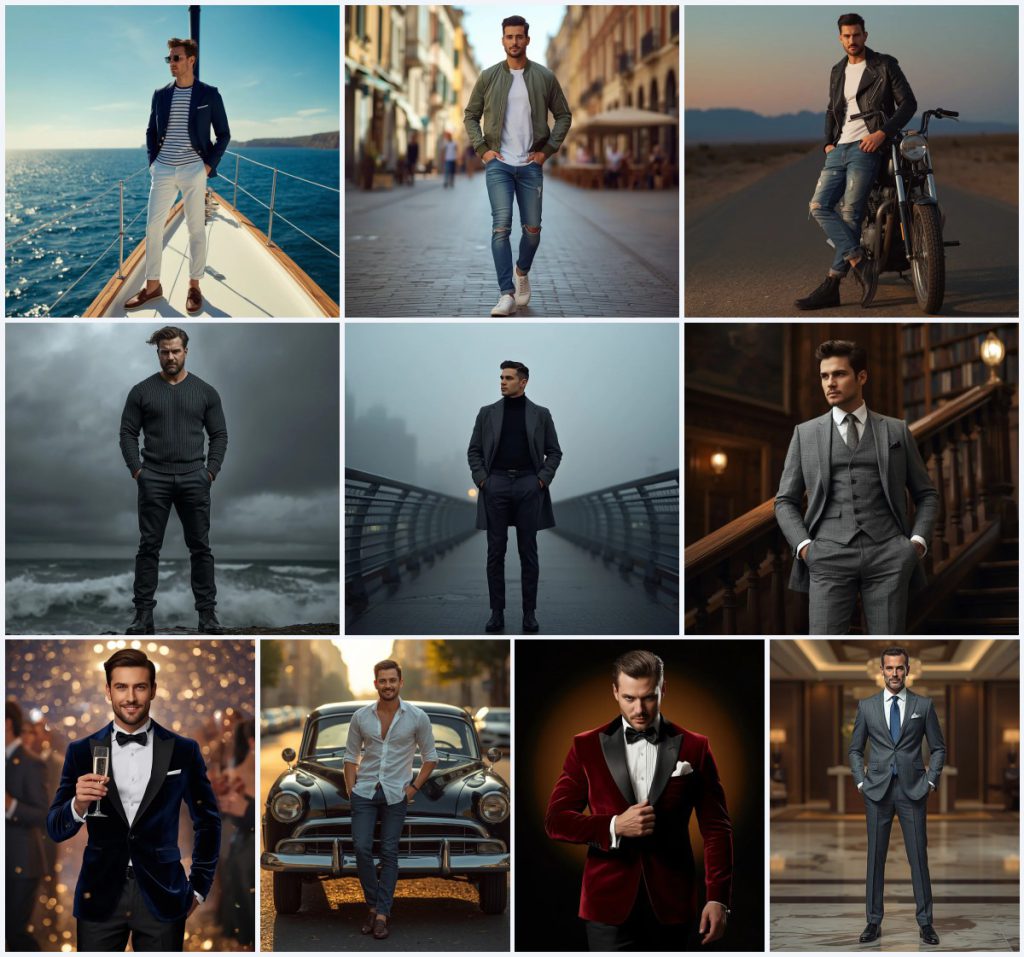
Men's style photography has become one of the most shareable corners of Instagram, and AI image tools now let anyone build that look without a studio, a stylist, or a plane ticket. This collection gathers ten prompt cards that each describe a different man, outfit, and location, from a sailing yacht to a misty bridge at dawn. Every card is written as a full-body editorial shot, so the result reads like a magazine page rather than a casual selfie.
The set works as a wardrobe and backdrop library. You can borrow the navy blazer and brass buttons from one card, the desert dusk and leather jacket from another, or the grand library staircase and checked suit from a third. Because each prompt already specifies lens, aperture, and lighting, the collection also doubles as a lesson in how camera language shapes mood. Below is a single guide to using the whole set well, not ten separate articles.
What this men's AI prompt collection is asking for
Across the ten cards, the common thread is a full-body male subject placed in a real, describable environment with clothing that carries texture. The prompts do not ask for abstract fashion; they name garments, materials, and weather. That specificity is what keeps the results from drifting into generic stock-photo territory, and it is also what makes the set easy to remix when you only want one element changed.
- A navy blue blazer with brass buttons on a sailing yacht deck, paired with white chinos and boat shoes.
- An olive green bomber jacket, plain white t-shirt, distressed jeans, and white sneakers on a sunlit European street.
- A black leather biker jacket against a vintage motorcycle on a desert road at dusk.
- A charcoal grey overcoat over a black turtleneck on a misty city bridge at dawn.
- A checked suit with matching vest inside an old library with towering bookshelves and antique lamps.
- A crimson red velvet dinner jacket with a black bow tie under a warm amber studio spotlight.
The shared scene and how each card shifts it
Every card builds a place before it builds a pose. The yacht card places the man "standing on the deck of a sailing yacht, overlooking the open sea," with "the vast, sparkling blue ocean, distant coastline, and a clear blue sky" behind him. The desert card swaps that for "a sweeping vista of desert landscape, distant mountains, and a gradient twilight sky," while the bridge card uses "a softly blurred cityscape enveloped in a gentle morning mist."
Lighting is described almost as carefully as the clothing. One card relies on "bright, natural sunlight" to bring out fabric texture, another on "warm, golden hour lighting" that transitions into soft blues, and a third on "cinematic, high-contrast lighting from the overcast sky." The studio card removes weather entirely and uses "a subtle warm amber spotlight behind him." That range is the real value of the collection: the same subject type, ten different atmospheres.
Why these prompts suit shareable men's content
These cards are built for the kind of image that stops a scroll, because each one pairs a recognizable male archetype with a setting that feels like a story. The viewer does not just see a man in a blazer; they see a man on a yacht at sea. That narrative framing is what makes the output feel postable rather than posed.
- Each prompt names a complete outfit, so the result looks styled instead of randomly generated.
- Each prompt names a location and a light source, which gives the image a mood you can caption around.
- The lens and aperture notes, such as 35mm, 50mm, 70mm, and 85mm, produce consistent editorial framing across the whole set.
Three style directions inside this set
You can group the ten cards into three style directions, and each one stays inside the prompt text rather than pulling in outside references. The first is luxury nautical and executive tailoring, the second is rugged travel and street casual, and the third is cinematic evening glamour. Choosing one direction before you generate keeps a feed visually coherent.
- Luxury nautical and executive: The yacht card with the navy blue blazer and brass buttons sits beside the grey suit in a hotel lobby with marble flooring, both reading as polished and high-end.
- Rugged travel and street casual: The olive bomber jacket on cobblestone streets and the leather biker jacket on a desert road both lean on distressed denim, boots, and golden-hour light.
- Cinematic evening glamour: The crimson red velvet dinner jacket under an amber spotlight and the dark blue velvet blazer at a New Year's Eve party both use velvet texture and dramatic reflections.
How to run one of these prompts end to end
Pick a single card rather than blending all ten at once, because mixing a yacht deck with a library staircase usually confuses the model. Work through the steps below in order, and keep the original text intact until you have a result you like.
- Copy the prompt. Copy one full card, including the outfit, location, lighting, and camera notes, into your AI image tool.
- Upload a reference. Upload a clear reference photo of the person or the pose you want, ideally full body and evenly lit.
- Generate the first pass. Run the generation once without edits so you can see how the model interprets the scene and clothing.
- Check hands and face. Look closely at fingers, wrists, and facial symmetry, since full-body shots often distort these first.
- Check the main object. Verify the yacht deck, motorcycle, vintage car, or staircase matches the prompt and is not melting into the background.
- Refine one variable. Change only one thing per rerun, such as lighting or jacket color, so you can tell what actually improved the image.
Choosing the reference photo
The reference image does more work than most people expect, because it controls body proportions and face shape while the prompt controls wardrobe and setting. A weak reference will pull even a well-written card toward an awkward result.
- Use a full-body reference with the subject standing straight, so the model can map clothing onto the correct proportions.
- Avoid harsh shadows across the face, since the prompt already defines its own lighting and the two will fight.
- Keep the background of the reference plain, so the model does not blend your room into the yacht deck or desert road.
Which tools handle these prompts best
Different platforms read long, descriptive prompts differently. The table below compares four common options against the kind of detail these cards contain, such as the velvet dinner jacket and the amber studio spotlight.
| Tool | Access | Typical realism | Useful here for |
|---|---|---|---|
| ChatGPT | Free and paid tiers | Good with strong prompt detail | Rewriting a card into a shorter version while keeping the crimson red velvet dinner jacket and bow tie intact. |
| Google Gemini | Free and paid tiers | Strong on scene and lighting | Handling the misty city bridge at dawn and the diffused ambient light described in that card. |
| Leonardo AI | Free credits, paid plans | High with tuned models | Testing the desert road at dusk with the black leather biker jacket and gradient twilight sky. |
| Midjourney | Paid subscription | Very high, editorial feel | Reproducing the sailing yacht deck, brass buttons, and 70mm lens framing as a luxury nautical editorial. |
Practical tips for cleaner results
Small adjustments to the prompt text often fix more than a dozen reruns. These three tips all reference objects and materials that already appear in the cards, so nothing new is introduced.
- Name the fabric when it matters, since velvet, leather, and linen each render differently, and the crimson red velvet dinner jacket needs that word to look lush.
- Keep the lens note if you want consistency, because 35mm on the cobblestone street card and 85mm on the stormy seascape card produce very different framing.
- Describe the light source rather than saying good lighting, so phrases like golden hour, overcast sky, and amber spotlight keep the mood you actually wanted.
Common problems and what to change
Most failures with this set come from the model overloading a single frame or losing a small object. The table lists the issues you are most likely to see and the single change that usually resolves each one.
| Issue | What to change |
|---|---|
| Hands merge or gain extra fingers in the full-body pose | Add a clear hand position, such as one hand in the pocket or adjusting a cufflink, and rerun. |
| The yacht deck, vintage car, or motorcycle looks warped | Move the object description earlier in the prompt so the model treats it as a primary subject. |
| Velvet or leather loses its texture and looks flat | Repeat the material word and add a close light source, such as the amber spotlight or golden hour light. |
| The face drifts from the reference photo | Upload a sharper, front-facing reference and lower any style strength setting before regenerating. |
Frequently Asked Questions
Can I mix two cards, such as the yacht blazer and the desert road?
You can, but keep one location and borrow only the outfit from the second card. Combining a yacht deck with a desert road usually produces a confused background and weaker composition.
Do I need a paid tool to get the velvet and leather textures right?
No, but realism improves with better models. Free tiers can handle the velvet dinner jacket and leather biker jacket if you repeat the material word and describe the light source clearly.
Why does the full-body framing keep breaking the hands?
Full-body shots give the model fewer pixels per hand. Specify the hand position in the prompt, such as one hand in the pocket, and check the fingers before you post.
Conclusion
This collection works best when you treat it as a wardrobe and location library rather than ten separate one-off images. Choose one style direction, keep the outfit and lighting language intact, and change only one variable at a time. Used that way, the yacht deck, the desert dusk, the library staircase, and the amber studio spotlight can all serve the same feed without looking repetitive.
Edit only photos you have the right to edit, and keep your reference images and generated results within the permissions you actually hold.